Email, sometimes written as e-mail, is simply the shortened form of electronic mail, a protocol for receiving, sending and storing electronic messages. Emails has gained popularity with the spread of the internet. However, as technology develops, from a boring written email, main sending have develop to video mail. If you are pondering what is a Video Mail, it is a tool to send a recorded video of yourself, as if you are writing an email to a receiver. Instead of writing long messages, you are able to talk live in the video, save it and send it as an email. There are a few websites that offer such services, and one of the websites is Mail Vu. Below is a link linking directly to the website and a picture of how the website looks like:
Unlike AudioBoo and Brainshark, Mail Vu not only allows recording of the users voice, it also allows the actually video to be taken. Users will be able to show emotions and body language as well when recording the video. However, users wont be able to do it Brainshark, where the PowerPoint presentation will be played during the recording.
Teachers can use this feature to good use. One of it is by having the students to sent video mail to the teacher as homework. Students can record their response to a argumentative based question and answer it using Mail Vu, and sent it to the teacher's email address. The teacher then can reply the video by sending a Mail Vu back to the student. Besides that, group work can be done by using Mail Vu as well. Students can gather in front of a webcam and record the activity that should be done by the students, such as group presentation or role play. Teachers must be creative in creating lessons and activity which involves Mail Vu, so that they can put Mail Vu to full use and in the same time, practice the speaking skills of the students. Below is a picture of how to send your Mail Vu to a receiver.
Advantages
It's free
Allows video recording and sending it to other receivers by sending it directly to the receiver's email.
Allows users to connect with family and friends, disregarding the location, time and distance
Allows a new form of activity, called the connected classroom, as it allows users to connect to each other despite the location of the learning take place.
Allows language learning to be done at the school or at home, and can be sent instantly to the teacher via V-mail.
Motivates the students to learn language as a purpose is provided to use the tool and students are able to speak freely, without any constrains from the teacher's monitor.
Allows retaking the recording if the student is not satisfied with the previous recording.
Disadvantages
If users wish to use other services, they need to pay for it.
Recorder video could not be embedded into any social websites such as blogger
Ever think of getting the chance to see all the listening materials that is available free for educators in one single website? Well, the search can come to an end as ELLLO, the All-in-One online English listening lesson library is available for anyone who wish to use the materials for their lesson plans or simply by motivating the students to learn English on their free time, in school or at home. There are a few sections available for the viewers to view, hear and use for any lessons: Views (general/culture), Games, Mixer, Videos, News etc. This sections are well organized by the top right side of the website, and viewers will be able to explore the website with ease. Below is the link to this awesome website, and a picture of the front page of the website:
Convienient as it is, the categories are lined up in a horizontal way, making it easy for the viewers to choose from:
1. Views
In this category, there are recorded conversation based on various topics. Along with the topics and recorded audio, there will be transcription available for the viewers to view in order to have a better understanding of the conversation, as both listening and reading skills are involved in the learning process. There will be quizzes as well for the viewers to complete as a practice based on the focus of the recorded audio. The greatest criteria for this category, which may exist in other categories as well, is there are video responses with subtitles included, as a response to the recorded audio. Not only the video response tool is a great way to comment, but other viewers can listen to other people opinion based on the first person point of view. By doing so, students may increase their motivation to speak, as viewers may notices that there are various accents of English included in this website, and not every sentence uttered is grammatical correct. This may cause awareness, especially to second language learners, that speaking English is not always about uttering the correct sentences straight out from a book, but having the courage to speak up and learn the language.
2. Mixer
This category is special as all the recorded audio is based on various accents. Hence, the listening activity may be a little bit tough for students as they need to adapt the different accents of English language all around the world. But it will be a great and interesting activity because it will be so much fun to hear different accents speaking on the same topic. There are transcription at the bottom of the recorded audio, with Audio Elaborator for vocabulary found in the transcription. There are quizzes and comprehension questions available for practice.
3. Games
For the Games category, it almost have the same function as Views has, however, the difference lies on the task provided. If any viewers explore this category, they will notice that this category will primarily focus on 3 language aspects, which is vocabulary, reading and speaking quizzes. These activities may prove to be useful for beginners of English language learners as it will scaffold learners in learning English.
4. News.
In the News section, viewers will notice that there are only two different accents of English found, which is UK and US English. Learners will have the choice of choosing over 20 broadcasts to play, together with listening questions based on the recorded video. There are too vocabulary questions available for learners to answer and learn.
These are the four main sections which i found may draw teachers and learners attention in learning English using ELLLO. Students as low as primary schools will be able to listen and complete questions based on the recorded audio or video, but teachers need to monitor all the students, as they may have problems with vocabulary. Teachers themsleves can make full use of the website to design a listening activity for the students in the classroom or simply by giving them the topic based on the category chosen and labelled it as homework to do. But these may cause problems as not every child has computers or internet connection in their residence, so the best is by making it as a listening lesson plan.
Advantages
There are a number of advantages for this website. The advantages are as follow:
It's free
There a number of categories to choose from
Quizzes and listening questions are included
Hearing different accents of English
Personalization - teachers and learners get to choose with topic interest them the most
As a support website for designing lesson plans
Autonomous learning
Provide a purpose for the students to listening, read, answers the questions and learn the language
One of CLIL websites
Disadvantages
The organisation of the contents may confused first time users,
No clear instructions on how to carry out the tasks
Some of the audio and video quality is not that good
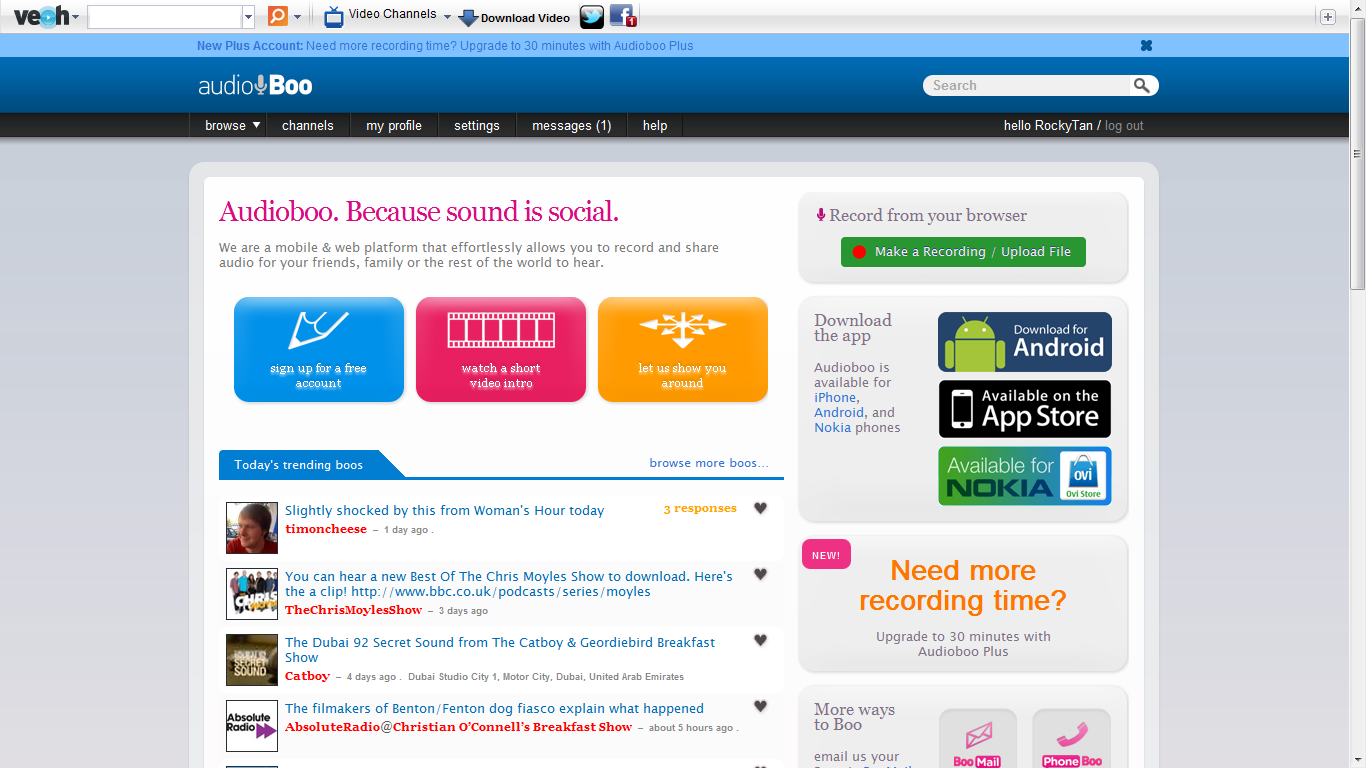
Audioboo is recently one of the most used online voice recording website. This website is just simply fantastic. Users can make impromptu interviews to be uploaded into any websites, recording some beautiful music that have been composed by any freelancing or contract composers, a recording of your life or even a radio show. Besides for leisure and personal use, Audioboo too can be used as a tool for recording reports or meetings, story telling or any educational use for language teaching. One of the best part of Audioboo is that is link to other platforms. Example of these platforms are like Twitter, Facebook, Posterous or even Tumblr. And if the user have iTunes, he or she can hear to any podcast as all of these will be available in iTunes. Below is a link to Audioboo and a picture of the frontpage of Audioboo:
By clicking the application to record your own podcast, it will lead the user to the page, or picture above. The steps that the users need to take notice of:
1. Start Recording
By plugging in your headphone and microphone (optional, it will be fine if you have a build in microphone in your notebook), you are all set to record your podcast. By clicking on 'Start Recording', the recording session will start.
2. Duration of Recording
On the left side of the recording button, there will be a timer. This timer will state how long have you been recording and may serve as a time limit for certain teachers for lesson planning, or limiting the time for a presentation by any individual, such as a student or businessman.
3. Recording Buttons
There are two recording buttons at the bottom of the 'Start Recording' button. You can preview the recording that you have made by hitting the 'Preview Recording', and listen to what you had recorded. If you are unsatisfied with the recording , you can re-record your podcast by hitting the other button to restart your recording.
When you are satisfied:
If you are satisfied with you recording, press 'Happy/ Add a title' button, and it will lead to the next page, which is the picture above. In this page, you can add a title to your recording. Besides that, you can insert some labels, regarding to what categories you recording. Below is a podcast of my blog:
How it is useful for teaching?
Teachers can record lots of podcast for students to listen to. Students can listen to these podcast in the school, at home, for any specific reason, such as revising to what the teacher had taught, or listen back to what the teacher have to explain about a lesson of literature in class. By providing such teaching aid to students, teaching language maybe easier as language can be learned not only in the classroom or ICT classroom, but students can excess to the teaching talking lessons online, as these recording will be available in any social websites, such as Twitter, Tumblr, Facebook or even iTunes. Besides that, teachers can prepare their lesson plans by singing by their own, composing their own song, and making it as a listening lesson for the class. The authenticity of the music will make the classroom more lively and students often response to authentic materials.
Advantages:
It's free
Useful for listening activity
Useful for making podcast
Available in different sources
Steps in making a podcast is easy as 1, 2, 3
One useful language teaching tool
Disadvantages:
In need of internet
In need of advance computer tools such as microphones
Teachers need to know how to mold this superb device into a teaching tool
Brainshark, an online presentation technology, is basically designed for business individuals such as marketers, sales people and executives for them to upload and present their presentation for business purposes. Users are able to upload their personal presentations onto their secure online myBrainshark account. When users uploaded their presentations on Brainshark, the system will automatically convert the presentations to a format supported by the system itself. Files such as .ppt, .pptx and .odp are accepted by the system to be converted to be used for the online presentation. Besides that, the maximum file is as large as 200mb and users are able to apply background music for the online presentation. Below is an example of Brainshark and its link to the webpage:
As stated above, brainshark is able to accept Microsoft PowerPoint as one of the sources to be converted to fit its compatibility of its system. After uploading the PowerPoint, users can use the telephone or computer microphone to record voice narration. Users will narrate the points and elaborate what they wish to convey as the voice recorder records the voice of the user on the particular slide. After saving the best voice narration for the slides, the user can move on the next step on narrate the next slide. Furthermore, users too can add additional features such as background musics. Below are some pictures of steps to be taken notice during narration of the slides:
Types of presentation that can be done :
Add voice to Power Point
Narrate a document
Upload a video
Make a photo album
Produce a podcast
Steps to be done for a PowerPoint narration:
Number of slides
As shown in the picture, that column shows the number of the slides. The slides is in the same order when the PowerPoint presentation is uploaded.
Visible part of the current slide
The large screen on the left of the column will show exactly what is in selected. This screen will ease the users to narrate what they wish to convey in the current slide.
Voice recorder (controller)
The voice recorder will act as the controller for the awesome device. Users can retake the narration if there is an error during narration, discard useless or error voice recording and also save the voice recorded.
Time duration for voice recording
In this column, there will be timers recorded for the duration of the narration for selected slides. Every slides has its own time duration besides it.
In the final stage, after saving and editing the voice-based presentation, the final Brainshark can be delivered via a Web link or can be embedded in a Web page, for example, in Blogger. Below is a product of narrated PowerPoint Presentation of my bibliography:
You can even go to my Brainshark page to view it through this link:
This website is very useful when it comes for language teaching and also sharing ideas with all the educators around the world. By preparing a PowerPoint presentation, the user is able to voice out his or her opinion on a certain subject or field and viewers can ask or give advises or opinion on the presentation itself. Besides that, language teachers can use this website to provide the classroom with a narrated PowerPoint Presentation, which may excite the class more and making language teaching in the classroom more enjoyable. Students may even learn more because students will not only listen to what the teacher narrated, but they will view as well what is the teacher talking about, enabling them to understand more about the subject being taught.
What I like about Brainshark:
Is free
Provide a list of services for users
Is easy to use
Providing visual and sound materials in a same time to the students in the classroom
PowerPoint presentation can be viewed by every viewers, as long as the slide is set for public views.
Sharing ideas to every educators on a particular topic
What I dislike about Brainshark:
Takes up a lot of time for narration
Requires constant use of internet as recording is activated and saved using internet
Facilities such as computers and laptops are needed
Dictation is mainly about the act of manner of transcribing words uttered by another person. Through the definition itself, teachers may expect this particular blog is about a listening activity to reproduce words from a dictation. However, we can say that dictation, in the current teaching process, can be considered as a old and boring way of teaching English. And this may demotivated student to continue to learn language, making teaching and learning unproductive. Nonetheless, there is a website that may change the perception about dictation.
Listen and Write - a free online website which uses recorded voices on various sources, such as current and past news reports, a short clip from a movie, or YouTube videos to produce dictation activities. Below is a printed screen of the website and a link is provided at the bottom of the photo:
Listen and Write, as stated in the above, expose students to most recent news and videos around the world. However, one important to be taken notice is that most of the voice recordings are taken from Voice of America. There a few types of activity provided in the website: full mode, quick mode and blank mode. Each mode has its own unique and way of completing the task, making this website even more interesting to be explored and used as an activity in the classroom for English language teaching.
Full Mode
Lets take full mode as an example. Firstly, teachers have to make sure about the text is:
The right level of text for the students.
The right topic for the subject.
As a reminder, the lowest level of the text maybe fairly hard to complete. Hence, teacher will have to constantly monitor the students, and provide oral advises to any student. In the listening activity, the text is divided into group of sentences. The online device will keep on repeating the displayed sentences until the students are able to complete re-writing the repeated sentences. After the students successfully completed re-writing that segments of the text, only then the media player will move into the next phase of the sentences of the text. The same process will be repeated until the students completed the whole text and obtaining a score for the activity done. Below is an example of a text that recently uploaded and can be done in a language class:
Level and Age of students
Based on the lowest difficulty designed in the website, i will recommend to be an activity for secondary schools students or above. I am not stating that this activity is not suitable for primary school students, but if teachers insists of using this activity for primary school students, close monitor has to been applied by the teachers so that those primary students will not be demotivated by the difficulty of the texts and general topics all around the world. Nonetheless, it will be a great activity for secondary school students or college students as it involves general knowledge and they should be able to cope up with the difficulty designed for the activity. It may be a challenge to students who does this activity, but it will be a great experience and it will guarantee enjoyment in doing it, especially when this activity is done in pairs or groups.
Advantage
As this website originally promotes listening as well as writing(or typing) skills, both skills are great advantages to the students who do this activity. Below are more example of the advantages to be discovered by the students as they indulge themselves into solving the segments of texts on this website:
Introduction to new vocabulary
Practice pronunciation through listening skills
Using cognitive skills to solve the text
There are variety of levels for the students to text themselves
Practice spelling skills
Grammar usage in the texts
Fun and challenging
Exposure to new languages
Disadvantage
There is no doubt that this activity has disadvantages as well. The disadvantages are:
Schools need to have some of the important facilities, such as internet connections and also computers.
Distraction of going to Facebook as there are Facebook application stamped on the website
Students will get motivated due to the difficulty of the texts.
Has teaching and learning through memorization and drilling had became one very common and boring process in the classroom? Well, i guess is time for a twist in teaching the students English using a very interesting method- Lyrics and Music. People may be guessing what an odd way to teach students using music, but Lyrics Training has made this unique yet wonderful activity a fun activity to be done in a classroom, or as game during bored times at home.
Students nowadays have taken music as one of the important part in their way of life. There is a increase of music listening as radio gained popularity and music videos are inserted to make music. Hence, by using music's fame, we teachers and this magnificent can use music as one of the medium to teach students English in a more motivating and fun approach. In Lyrics Training, music users just have to choose a YouTube-hosted music video and select one of the three mastery levels: Beginner, Intermediate and Expert. As the video begins to play, the lyrics of the song appear.
The link is as below and a picture upload to show the example of the website:
Below is a picture when the activity is been done in the intermediate level.
As the video begins to play, the lyrics surface up. The students need to re-write the original lyrics as the words will be left out as they are sung. The song will repeat the same line of lyrics until the students are able to fill in all the missing words. However, students need to fill in as fast as possible as Lyrics Training will keep track of the time spent in completing the whole song. In other words, this activity may not only serve as a webpage to teach English, it too can be a competition for students to achieve the highest score for playing the game. And this may increase the motivation and interest of the students to learn English through music.
Level and Age of Students
For this activity, students as low as beginners level and as high as advance level can make use of this web site to learn English. This is because there are different levels of mastery for different level of students to choose from to play. The age of the students usually begins from primary schools and can be as matured as college students. This is because music is such a powerful trend in today's society that any student of any age may have the interest to learn when it comes to music. Hence, this activity may just prove to be one of the most efficient yet exciting tool to teach English.
Advantage
Through the thorough explanation above on the website, teachers should be able to see the benefits through using Lyrics training as the medium to teach English in the classroom. Nevertheless, i will try to voice out a few advantages, so that readers will be able to understand more why i have chosen this website as one of the activities in teaching English. There are a few advantages using Lyrics Training as one of the activity in the classroom to teach English. Advantages are as below:
It's lots of fun.
Increase the interest and motivation of the students to learn.
Learning new vocabulary
Promote autonomous learning
Students are required to use different skills, such as listening and cognitive skills.
Spelling training
Teachers able to monitor students in doing the activity.
However, there is a few disadvantage of this activity, in the sense of utilizing it or reaching the aim in learning English. Here are some of the disadvantage:
Disadvantage
Schools need to provide internet connection and also computers, which may prove as a nuisance to rural schools.
Speakers of the computer need to be fully functional as students get the answers through listening skills.
Students may not learn important part of acquiring English such as grammar and sentence structure.