Showing posts with label Vocabulary. Show all posts

Thursday, November 24, 2011

Elllo, The English 'Teacher'

Elllo, The English "Teacher" (mp3)

The All-in-One English Website

Ever think of getting the chance to see all the listening materials that is available free for educators in one single website? Well, the search can come to an end as ELLLO, the All-in-One online English listening lesson library is available for anyone who wish to use the materials for their lesson plans or simply by motivating the students to learn English on their free time, in school or at home. There are a few sections available for the viewers to view, hear and use for any lessons: Views (general/culture), Games, Mixer, Videos, News etc. This sections are well organized by the top right side of the website, and viewers will be able to explore the website with ease. Below is the link to this awesome website, and a picture of the front page of the website:

http://www.elllo.org/english/home.htm


Convienient as it is, the categories are lined up in a horizontal way, making it easy for the viewers to choose from:

1. Views

In this category, there are recorded conversation based on various topics. Along with the topics and recorded audio, there will be transcription available for the viewers to view in order to have a better understanding of  the  conversation, as both listening and reading skills are involved in the learning process. There will be quizzes as well for the viewers to complete as a practice based on the focus of the recorded audio. The greatest criteria for this category, which may exist in other categories as well, is there are video responses with subtitles included, as a response to the recorded audio. Not only the video response tool is a great way to comment, but other viewers can listen to other people opinion based on the first person point of view. By doing so, students may increase their motivation to speak, as viewers may notices that there are various accents of English included in this website, and not every sentence uttered is grammatical correct. This may cause awareness, especially to second language learners, that speaking English is not always about uttering the correct sentences straight out from a book, but having the courage to speak up and learn the language.

2. Mixer

This category is special as all the recorded audio is based on various accents. Hence, the listening activity may be a little bit tough for students as they need to adapt the different accents of English language all around the world. But it will be a great and interesting activity because it will be so much fun to hear different accents speaking on the same topic. There are transcription at the bottom of the recorded audio, with Audio Elaborator for vocabulary found in the transcription. There are quizzes and comprehension questions available for practice.

3. Games

For the Games category, it almost have the same function as Views has, however, the difference lies on the task provided. If any viewers explore this category, they will notice that this category will primarily focus on 3 language aspects, which is vocabulary, reading and speaking quizzes. These activities may prove to be useful for beginners of English language learners as it will scaffold learners in learning English.

4. News.

In the News section, viewers will notice that there are only two different accents of English found, which is UK and US English. Learners will have the choice of choosing over 20 broadcasts to play, together with listening questions based on the recorded video. There are too vocabulary questions available for learners to answer and learn.


These are the four main sections which i found may draw teachers and learners attention in learning English using ELLLO. Students as low as primary schools will be able to listen and complete questions based on the recorded audio or video, but teachers need to monitor all the students, as they may have problems with vocabulary. Teachers themsleves can make full use of the website to design a listening activity for the students in the classroom or simply by giving them the topic based on the category chosen and labelled it as homework to do. But these may cause problems as not every child has computers or internet connection in their residence, so the best is by making it as a listening lesson plan.

Advantages

There are a number of advantages for this website. The advantages are as follow:

  • It's free
  • There a number of categories to choose from
  • Quizzes and listening questions are included
  • Hearing different accents of English
  • Personalization - teachers and learners get to choose with topic interest them the most
  • As a support website for designing lesson plans
  • Autonomous learning
  • Provide a purpose for the students to listening, read, answers the questions and learn the language
  • One of CLIL websites
Disadvantages
  • The organisation of the contents may confused first time users,
  • No clear instructions on how to carry out the tasks
  • Some of the audio and video quality is not that good


Wednesday, November 23, 2011

Teaching and Pod-casting with my Boo

Teaching and Pod-casting with my Boo (mp3)

Audioboo- My Boo

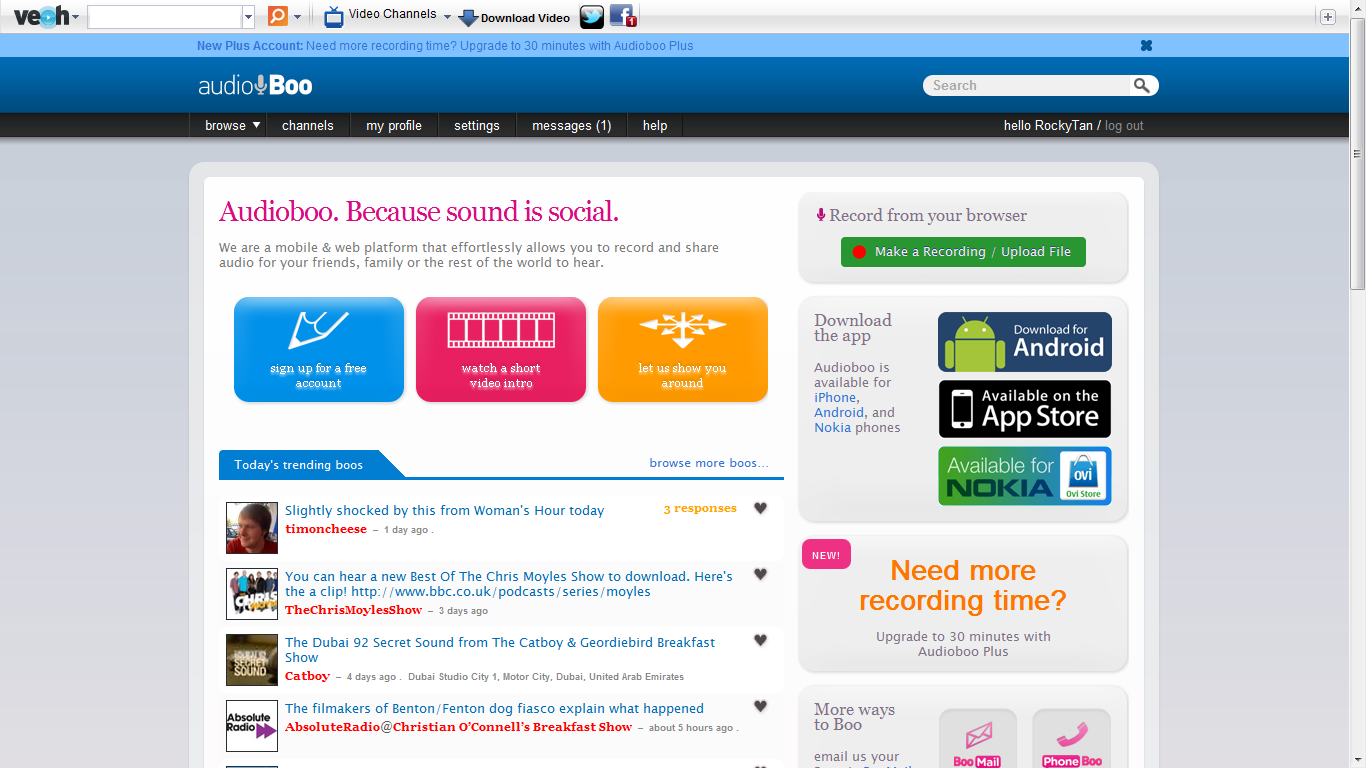
Audioboo is recently one of the most used online voice recording website. This website is just simply fantastic. Users can make impromptu interviews to be uploaded into any websites, recording some beautiful music that have been composed by any freelancing or contract composers, a recording of your life or even a radio show. Besides for leisure and personal use, Audioboo too can be used as a tool for recording reports or meetings, story telling or any educational use for language teaching. One of the best part of Audioboo is that is link to other platforms. Example of these platforms are like Twitter, Facebook, Posterous or even Tumblr. And if the user have iTunes, he or she can hear to any podcast as all of these will be available in iTunes. Below is a link to Audioboo and a picture of the frontpage of Audioboo:


http://audioboo.fm/


Ways of using Audioboo for podcasting.


By clicking the application to record your own podcast, it will lead the user to the page, or picture above. The steps that the users need to take notice of:

1. Start Recording

By plugging in your headphone and microphone (optional, it will be fine if you have a build in microphone in your notebook), you are all set to record your podcast. By clicking on 'Start Recording', the recording session will start.

2. Duration of Recording

On the left side of the recording button, there will be a timer. This timer will state how long have you been recording and may serve as a time limit for certain teachers for lesson planning, or limiting the time for a presentation by any individual, such as a student or businessman.

3. Recording Buttons

There are two recording buttons at the bottom of the 'Start Recording' button. You can preview the recording that you have made by hitting the 'Preview Recording', and listen to what you had recorded. If you are unsatisfied with the recording , you can re-record your podcast by hitting the other button to restart your recording.

When you are satisfied:


If you are satisfied with you recording, press 'Happy/ Add a title' button, and it will lead to the next page, which is the picture above. In this page, you can add a title to your recording. Besides that, you can insert some labels, regarding to what categories you recording. Below is a podcast of my blog:


How it is useful for teaching?

Teachers can record lots of podcast for students to listen to. Students can listen to these podcast in the school, at home, for any specific reason, such as revising to what the teacher had taught, or listen back to what the teacher have to explain about a lesson of literature in class. By providing such teaching aid to students, teaching language maybe easier as language can be learned not only in the classroom or ICT classroom, but students can excess to the teaching talking lessons online, as these recording will be available in any social websites, such as Twitter, Tumblr, Facebook or even iTunes. Besides that, teachers can prepare their lesson plans by singing by their own, composing their own song, and making it as a listening lesson for the class. The authenticity of the music will make the classroom more lively and students often response to authentic materials.

Advantages:

  • It's free
  • Useful for listening activity
  • Useful for making podcast
  • Available in different sources
  • Steps in making a podcast is easy as 1, 2, 3
  • One useful language teaching tool

Disadvantages:

  • In need of internet
  • In need of advance computer tools such as microphones
  • Teachers need to know how to mold this superb device into a teaching tool


Just Click and Learn !!

Just Click and Learn !! (mp3)

Learning English using ClickandLearn.net

ClicknLearn is a interactive website for different age of students to learn English using the content provided in the website. Besides English, this website to teach French and is originally made using Spanish. However, the content can be switch into English and used to teach English learners. Below is a picture of the website and the link to the page:


Activities that can be done and some of the advantage found in this website

In this website, the activities is mostly about grammar and games. However, both are separated into a few categories, following the age of the students. Students will learn through the contexts provided by the website. For example, solving a problem in a specific situation or context, that requires grammatical correctness. The activities too include different exercises that can combine in various basic skills that not only will promote to problem solving, but too will promote the fixation and internalization of what have the students had learned. Besides that, the activities might be fun and motivating to some students, promoting a friendly learning environment in the classroom.

Some of the major disadvantages

There a few major disadvantages that can be spotted if teachers are to use this website. One of the things that i don't fancy of is, that there a lot of sound included in unnecessary places, such as the starting of the website, and some odd noises added into the games. For me, i personally think that if the programmer or creator of this website replace those sounds with voice projection of any tasks, will be more beneficial compared to some random noise. The second disadvantages that i can notice in the website, is that there are just too many texts. Students may get bored or demotivated with all the texts presence in the website. There are not many pictures included, taking language learning to the old days, of drilling and grammar-focused. Lastly, there are no assistance if the students have done something wrong, or unable to answer a question. The absence of such important aid for language learning eventually degraded such a high potential language teaching website.


The Online Concordance Analyzer

The Online Concordance Analyzer (mp3)

Learning Vocabulary with Just The Word

When a English Language learner have difficulty with a word, on how to use it, and is there any alternative to it, this website will provide a full aid on how showing how a word can be used in any word class: verb, adjective, etc. As stated by the programmer of Just The Word, this website is a new generation of aid, which is by using technology, instead of using a dictionary or thesaurus, to help learners with English writing and choosing the appropriate words in their piece of writing. Just The Word is based on a huge amount of English text analysis, and these data gained from the analysis help to built this web site, with the main motive of helping new learners of English on choice of words or simply by suggesting improvements. There are two types of modes the learners or users of this website can choose from: 'Thesaurus' or 'Learner Errors'. By choosing the 'Thesaurus' button, the website will show semantic proximity. However, by choosing 'Learner Errors', this website will use a corpus of actual learner errors of all types by speakers of various languages. Below is the link to the page and a picture of how the website looks like:


Show Combinations of Words

In Just the word, there is about 80,000,000 words of the British National Corpus (BNC). Below is the how learners can look for words in this magnificent website:

"Type a word into the box and hit return or Show Combinations. JustTheWord will give you a detailed description of the company which that word keeps in modern-day English. To help you find your way to the information you need, in the right-hand frame you'll find the part(s)-of-speech and the types of relation that the word is found in. If you're looking for the right adjective to modify a noun you've chosen, click on the 'ADJ mod ' link. If you want a verb with the noun as its object, follow the 'V obj ' link. Within many types of relation you'll find the uses of the word clustered into groups with a similar meaning. The words that are not assigned to a cluster are grouped together at the end of the relation."

Above is a description from the the programmer on how to use this website and what to look out for. The green bar beside each combination will notify the learners of how strong it is. Technically, the bar shows how often he combination occurs in real life writing and speaking. Hence, learners will have a sense of awareness on how often these words had been used. Below is a picture taken of the a word searched:


What is good or bad about JustTheWord?


This website is primarily good for language learners. This is because the website is totally language-based and will aid student in their vocabulary and choice of words. Besides that :
  • It's free
  • Two type of modes to choose from
  • Examples of sentences on how to use the vocabulary
  • Different forms of a particular word
  • Word class is stated
I have not notice any downside of this website. If any of my viewers discover any disadvantage of this website, please notify in the comment below. Thank you.

Tuesday, November 15, 2011

Vocabulary in Word Clouds

Vocabulary in Word Clouds (mp3)

Introducing Wordsift.

What is Wordsift and the purpose of the website?

Wordsift is a website that allows teachers to insert text and play with the results. When Wordle makes colourful word clouds, Wordsift takes the most used 50 words of the passage that the user inserted and brings up Google images that use the Visual Thesaurus word-cloud web on the page. This is a quotation from the creator of Wordsift:

"Wordsift was created to help teachers manage the demands of vocabulary and academic langauge in their text materials. We especially hope that this tool is helpful in supporting English Langauge Learners. We want Wordsift to be a useful tool, but we also want it to be fun and visually pleasing. We would be happy if you think of it playfully- as a toy in a linguistics playground that is available to instantly capture and display the vocabulary structure of the texts, and to help create an opportunity to talk and explore the richness and wonders of language. " (Wordsift, 2010)

By looking at what the statement made by programmer in Wordsift, there is no doubt now that Worsift is a tool for education. By what is the usefulness of this website? Below is the link to the Wordsift and steps that can be done in the website


After inserting the text, Press Sift.

On the lower right corner of the picture above is the previous page before proceeding into the current page showed. Users are allowed to copy and paste a text into a blank space provided. After pasting the text, press Sift and Wordsift will take the most used 50 words of the passage that the user inserted.

A cloud of vocabulary will appear after pressing the Sift button.

After hitting the Sift button, a word cloud of the most used 50 words of the passage will appear. There are different sizes of the words appear in the cloud. The words are clickable, and by doing so, pictures from Google will appear under the tag of the word. Besides that, there will be a visual thesaurus at the bottom of the word cloud. The website will show parts of text that uses the vocabulary below the visual thesaurus, enabling the students to understand more on how that particular vocabulary can be used in an actual sentence.

Here are some pictures of the Google images, visual thesaurus and the parts of texts:


What can be done using this tool?

There is a lot of activities that can be done by using this tool. One of the basic activity is by using the text and images to create worksheets of important vocabulary words. Students too can sort words by subject area to create vocabulary cards with synonyms. Wordsift will aid the students in finding important vocabulary words from the text, and acquire those words for their future use. Besides that, teachers or the students can make use of the vocabulary words and images to be presented through PowerPoint or Word to be share among everyone.

What i like about Wordsift.

There are a few advantages that makes me prefer this website to teach vocabulary. These advantages are:
  • Free
  • Allows copy and paste of text
  • Sort out the 50 most used words
  • Visual thesaurus provides synonyms for the word
  • Google images provides pictures linking to the word
  • Provide the example of texts using the particular word

Disadvantages

However there are a few weakness as well:
  • Words that are useless, but is frequently used in the text, such as pronouns (name of a country, etc) is in the word cloud as well
  • The words can confusing and overwhelming, as the students need to look at 50 words in a go.


Colours, Clouds, and Vocabulary Combined in One

Colours, Clouds, and Vocabulary Combined in One (mp3)

Wordle- The Online Vocabulary Tool

Generally, today's students are mostly visual learners and word clouds provide visuals for students to interpret and understand the words and language on a deeper level. In addition, colours effect memory and the brain;s capacity to retain more information. In other words, a colour picture is easier to remember compared to a picture of black and white. Hence, by combing colours and visuals in language teaching, teachers may increase students' attention and retention. Will you teach students new group of vocabulary by using a plain text, printed on a plain white piece of paper, or teaching students using this example:

I will definitely will agree teaching the students by using the word cloud above, filled with wonderful colours and word style. Hence, in this post, I will introduce a new website called Wordle. Wordle allows not only teachers to create word clouds as above to teach the students, students themselves can make full use of this website to search for new and frequent vocabulary in a text. By providing a short text or full article into a blank space in the website, this magnificent will produce a visual Tag Cloud of the most common words used in the text. Below is the link and a picture describing how and what can be done in creating a word cloud using Wordle:


1) Insert your text.

There is a large white blank space in the middle of the webpage. In that blank page, users are allowed to copy and paste a short text or an article into that space. After pasting in the text, press Go, and the webpage will lead you to the next page.

2)Word Cloud created.

After clicking Go in the previous page, a word cloud of the new and frequent vocabulary used in the text will be created. Users are allowed to edit the word cloud, which i will describe in the following step. When the user is satisfied with the cloud created, the user can either save it, or PRINT it out.

3)Editing your word cloud.

In this section, users can edit the word cloud in any ways that they desire. There are a few options available for the users to edit their word cloud.
  • Language- Insert or cut out any language that the user wants in the word cloud from the text.
  • Font- Users get to choose from a large variety of beautiful style of fonts.
  • Layout- Edit the way of the words is shown in the word cloud, such as horizontal, vertical, mix, etc.
  • Colour- Users get to choose a variety of colours prepared by the creator of Wordle to use for the vocabulary in the word cloud, or the users can edit the colours of the word cloud by selecting the colours manually.

Below are a few beautiful examples of word clouds:


Is it useful in teaching language in a language classroom?

Wordle is basically link to vocabulary, so it has a direct link to language teaching and language classroom. It all depends on how the teacher wish to teach the students and also the level of the students. However, the level of students is usually related to the level of the text inserted to make the word cloud. The word cloud can be used in language teaching in many ways. Educators can use it to teach it through traditional way of teaching, such as having the students to define or explain to each other each vocabulary in the word cloud. This activity can be done as a post-reading activity, at the very end of the lesson. Besides the traditional way of teaching students language using Wordle, these are some other ways that a teacher can use to teach using word clouds:
  • Have the students to create a Wordle themselves as an ice breaking activity.
  • The teacher could assign each group of students of what they are about to study and have them come up with as many facts as they can. After writing down their words, they can present their Wordle to the class and compared with other groups.
  • Students are required to create a Wordle from a reading assignment to use as a pre-reading activity.
  • Give students a specific topic, such as 'friendship' and have all the students to use Wordle shown in the screen to seek out all words related to friendship.

Advantages

Wordle is a superb website and now is one of the most famous vocabulary teaching tool, spreading among all teachers around the world. This is due to the advantages the website got to offer, such as:
  1. It's free.
  2. No account is needed
  3. Wordle is easy as 1,2,3
  4. Users are able to print out the word cloud for classroom activities purposes

Disadvantages

However, there are too disadvantage in using this website; and the weakness is that the users could not edit the format of the words shown in the word cloud.